
Appearance
Use arithmetic in a field
Type a sum instead of a number. Dimensions, point coordinates, extrude distances, blend sizes, all of them.
Worked examples
| Type | Get | Use |
|---|---|---|
25.4 * 2 | 50.80 | Two inches |
1.5 * 25.4 | 38.10 | An inch and a half |
120 / 3 | 40.00 | Three equal divisions |
40 / 2 - 3 | 17.00 | Half, less a wall thickness |
sqrt(40^2 + 25^2) | 47.17 | The diagonal of the plate |
hypot(40, 25) | 47.17 | The same, more directly |
2 * pi * 12 | 75.40 | A circumference |
50 * sin(30) | 25.00 | Trigonometry, in degrees |
max(12, 8 + 3) | 12.00 | Whichever is larger |
round(37.8) | 38.00 | To the nearest whole millimetre |
Angles are in degrees throughout, matching what the angle fields display. sin(30) is 0.5.
Committing
Enter evaluates and commits. The field then shows the result.
A field that cannot be parsed turns red and keeps your cursor, so a typo is corrected in place. Clicking away from a bad expression abandons it and the field returns to the stored value.
What is kept
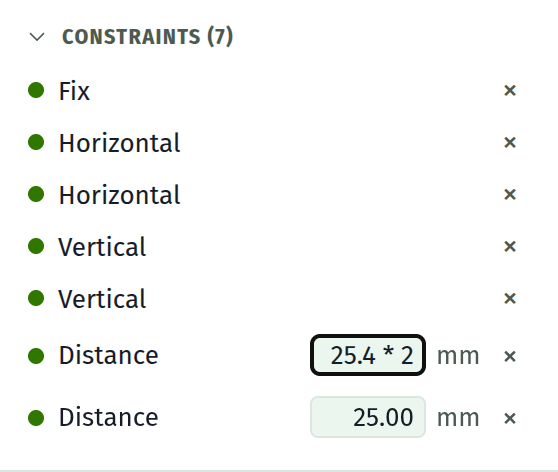
Both the number and the sum. The field shows 50.80 while idle and 25.4 * 2 when you focus it, so the intent survives and is editable. A small fx mark says the field carries one.
Typing a plain number over it drops the sum.
Point X and Y fields keep only the number. They are solver output, moved by dragging and by constraints, so a stored expression would be overwritten on the next solve.
Reference a value from several fields
Give it a name. A parameter is a named value that any field can be driven by, and changing it changes everything that names it.
plate = 40 in the table | The value, once |
plate / 2 in a dimension | Half of it, and it follows |
plate - 2 * wall in another | Whatever the relationship is |
Constraints are still the better tool where the relationship is geometric. A Symmetric or Equal constraint survives dragging; an expression is recomputed only when the parameter behind it moves.
Full grammar
Expressions lists every operator, constant and function.