
Appearance
Expressions
Every numeric field takes arithmetic, not just a number. Dimensions in the docket, the X and Y fields for a point, extrude distances, blend sizes, and the editor that opens on a canvas dimension.
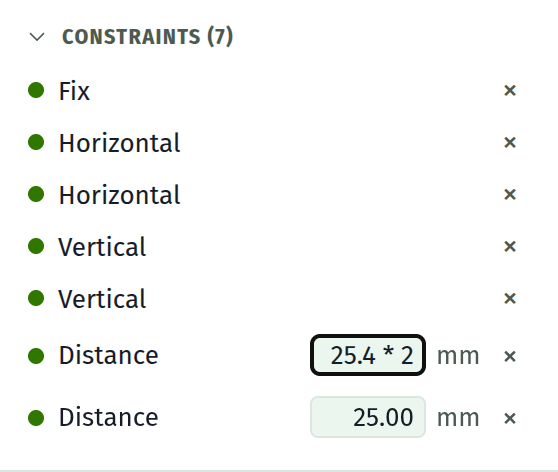
Type 25.4 * 2 into a dimension and press Enter, and the field commits 50.80.
Grammar
Standard precedence. Tightest binding last:
expr   :=  term (('+' | '-') term)*
term   :=  unary (('*' | '/' | '%') unary)*
unary  :=  ('-' | '+') unary | power
power  :=  atom ('^' unary)?
atom   :=  number | '(' expr ')' | name '(' args ')' | name
^ is right associative, so 2^3^2 is 512 rather than 64.
Operators
+ - * / | The usual |
% | Remainder |
^ | Power |
( ) | Grouping |
Constants
pi | 3.14159... |
tau | 2 pi |
e | 2.71828... |
Functions
sqrt(x) abs(x) | |
floor(x) ceil(x) round(x) | |
sin(x) cos(x) tan(x) | Argument in degrees |
asin(x) acos(x) atan(x) | Result in degrees |
min(a, b, ...) max(a, b, ...) hypot(a, b, ...) | Any number of arguments |
Degrees throughout, matching what the angle fields display. sin(30) is 0.5.
Units
A trailing mm, deg, or ° is stripped and ignored. 40mm is 40. This exists so pasting a value that carries its unit does the obvious thing, rather than as a unit conversion: there is no unit system to convert between, and everything is millimetres and degrees.
To work from inches, do the conversion yourself in the field: 1.5 * 25.4.
Committing
| Enter | Evaluate and commit |
| Esc | Revert to the stored value and leave the field |
| Click away | Commit if valid, revert if not |
A field that cannot be parsed turns red and keeps focus on Enter, so a typo is corrected in place rather than silently swallowed. Clicking away from a bad expression abandons it and the field returns to the value the model holds. Nothing is ever committed half-parsed.
The dimension editor that opens on a canvas annotation shows a live = 20.00 preview underneath as you type, so you can see the result before committing.
Names
A bare name resolves against the document's parameters first and the built-in constants after. Define width = 40 in the table and width / 2 works in any dimension, extrude distance or blend size.
A parameter cannot be named after a constant, a function, or the unit suffixes mm and deg, since those already mean something here.
What is stored
A field driven by a parameter keeps the expression as well as the value, and shows the expression when you focus it. A field carrying plain arithmetic keeps it the same way, so 25.4 * 2 is still 25.4 * 2 when you go back to it.
Typing a plain number over either drops the expression.
Point X and Y fields are the exception: they take arithmetic, keep nothing, and show the number. They are solver output, so a stored expression would be overwritten on the next solve.
A note on safety
This is a hand-written parser, never the browser's own code evaluator. A document read from disk or produced by the importer cannot smuggle code into a numeric field.