
Appearance
Parameters
A parameter is a name with a value behind it. Once one exists, any numeric field can be driven by it: type width into a dimension instead of 40, and the dimension follows width from then on.
The table lives in the Parameters group of the document tree, between the constraint docket and the bodies list. It starts collapsed and empty.
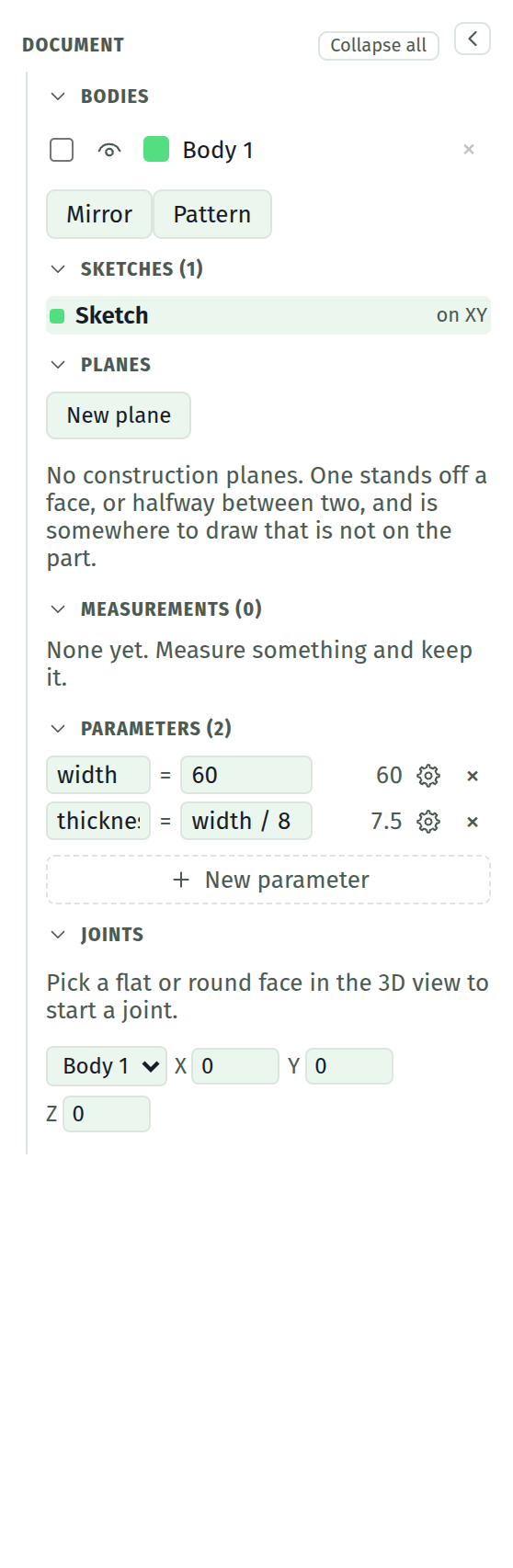
The table
New parameter appends a row. Each row is a name, an expression, and what that expression came to.
| Column | |
|---|---|
| Name | Letters, digits and underscore, starting with a letter |
| Expression | Anything a numeric field takes, including other parameter names |
| Value | What it resolved to, or ? when it did not |
Both fields commit on Enter or when you click away, and revert on Esc. Nothing is committed per keystroke.
A parameter may name another parameter, above it or below it in the table, so height = width * 0.6 works whichever order the two rows sit in.
Exposing a row as a control
The gear on a row puts it in the Configure panel: a drawer of its own where the parameter wears a slider, a set of named choices, a switch, or a plain field, grouped and captioned however you set it up. The table stays the single place a parameter is defined; the panel is the face on it.
Driving a field
Type a parameter name, or any expression using one, into a dimension, an extrude distance, or a blend size. The field commits the number and remembers the expression.
A driven field carries a small fx mark. Hover it to see what drives it.
| Idle | Shows the number, so you can read the model |
| Focused | Shows the expression, so you can edit what you meant |
| Esc | Leaves the expression alone |
Changing the parameter changes every field it drives. The sketches are re-solved and the solid rebuilds, exactly as if you had retyped each dimension by hand.
Stopping a field being driven
Type a plain number into it. The expression is dropped and the fx mark goes, leaving the number you typed. There is nothing else to click.
Renaming
Renaming a parameter rewrites every reference to it: the other parameters, and every field driven by one. A name is safe to change after a model is built on it.
What will not resolve
A row shows a reason instead of a value when it cannot resolve.
needs a name | The name field is empty |
another parameter has this name | Names are unique, and case does not distinguish them |
"pi" already means something in a field | Built-in constants, function names, and the unit suffixes mm and deg are taken |
refers to itself, round a cycle | a = b and b = a, or any longer ring; every parameter around it says so |
unknown name "wall" | The expression names something that is not in the table |
A parameter that will not resolve drives nothing. The fields that named it keep the last value that worked.
Deleting one
Deleting a row leaves the fields it drove exactly where they are, holding their last good value, with their expressions intact. The section then lists what stopped resolving:
2 fields stopped resolving. Each holds the last value that worked; re-add the name or retype the field.
Re-adding the name puts them all back. This is deliberate: a driven field that quietly stops being driven is worse than one that says so.
What is not driven
Point X and Y fields take arithmetic like every other field, and are not driven by parameters. They are solver output, moved by dragging and by constraints, so a stored expression would be overwritten on the next solve.
The far end of a tapered blend is likewise not driven. It has no field of its own once the blend is in the timeline.
Undo
A parameter edit is not an undo step. Undo works on sketch geometry, and undoing one would put the geometry back while the table still said something else. The table is directly editable, so typing the old value back is the way out.
Where they are stored
In the document, alongside the sketches. See saved files.