
Appearance
Joints
The last group of the document tree. A joint holds one body against another, so an assembly stays together when it moves: shift the body that holds and everything jointed to it comes along.
Without a joint, two bodies are two solids that happen to be where their sketches put them. Moving one moves nothing else.
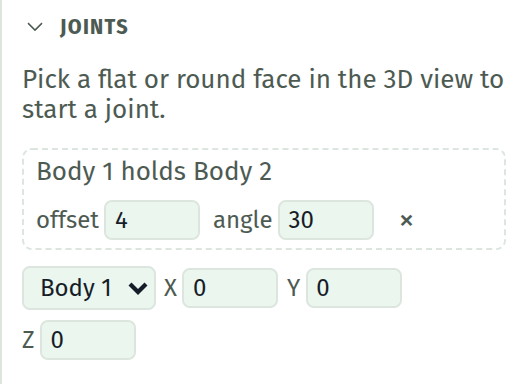
Making one
A joint is made from two faces, one on each body, so it is picked in the 3D view rather than typed.
- Click a face of the first body. The section offers Grip <face> of <body>; press it.
- Click a face on a different body. The section offers Joint <body>; press it.
The second body is the one that moves. Its face is turned to meet the gripped face, and it lands centred on it.
| Face picked | What the joint turns about |
|---|---|
| A flat face | Its outward normal, through the middle of the face |
| A hole or a round wall | The axis of the cylinder, which gives a hinge |
A face that is neither flat nor round cannot be gripped, and neither can a face left by a blend: there is nothing durable to hold on to. The message says so and nothing is made.
The two numbers
Every joint is the same relation with two numbers on it, and which number you reach for is what makes it a fastening, a hinge or a slide.
| Field | Means | Reach for it when |
|---|---|---|
| offset | Millimetres along the shared axis. Zero puts the two faces together | The parts stand off each other, or slide along the axis |
| angle | Degrees about that axis | The part swings on it |
There is no joint type to choose. Fastening two parts is a joint whose numbers you leave alone; a hinge is the same joint with the angle driven; a slide is the same joint with the offset driven.
TIP
The two numbers take plain numbers only. Unlike a dimension or an extrude, a joint cannot be driven by a parameter.
Moving a chain
Under the joint list: a body picker and three fields, X, Y and Z, in millimetres from where that body's features built it.
The fields are for the body at the head of a chain. A body a joint holds shows them greyed and says so: its joint decides where it goes, and pushing it as well would be two answers to one question.
The move arrows in the model view drive these same three numbers, and the picker follows whichever body the arrows are standing on, so the two controls are one selection rather than two.
Rows
| Element | What it does |
|---|---|
| Holds | Reads "A holds B": A is the body that was gripped, B the one that moves |
| offset | Along the shared axis, mm |
| angle | About it, degrees |
| × | Removes the joint. The body it held goes back to standing where its features built it |
What a joint refuses
| Case | What happens |
|---|---|
| A second joint on the same body | Refused when it is made. Two joints would fight, and a placement satisfying neither is worse than a refusal |
| A joint from a body to itself | Refused: a joint holds one body to another |
| Bodies jointed in a loop | Said in the section rather than approximated. A ring has no body to start from, so break the chain |
| A gripped face that is gone | Said, and that body stands where its own features put it. The rest of the assembly still builds |
Deleting a body takes its joints with it, on the same reasoning a combine goes: body numbers are never reused, so a joint left behind could never resolve again.
A joint whose bodies are not currently built (one was consumed by a combine, or the rollback marker stands in front of the feature that builds it) is not an error. It waits, and takes effect again as soon as its bodies are back.
What a joint is not
Not a constraint solver. A joint says exactly where the held body goes; it does not search for a position that satisfies several requirements at once. That is why one joint per body is the rule rather than a limitation to work around.
Not contact. Nothing checks whether the parts pass through each other. Turn a hinge far enough and the parts will happily overlap.
Not a weld. The two bodies stay two bodies. To make them one solid, use the boolean picker in Bodies, which acts where the joint has put them.
What is saved
The joints, as the two faces they grip plus the two numbers, and the moves given to bodies at the head of a chain. Where the held bodies ended up is not saved: it is worked out again on load, from the geometry the document builds. A joint therefore rides any change to the part it grips.
See also
- Bodies, for the list and the boolean picker
- Hold two bodies together, for the walkthrough
- Face references, for how a gripped face is named
- What is missing, for the rest of what assemblies do not do yet