
Appearance
Revolve
Turning a closed profile about an axis instead of pushing it along the sketch plane's normal. It is how a round part is made: a shaft, a knob, a bottle, a pulley, a groove all the way round something.
Press Revolve… in the Timeline, or Q, and the command dialog opens over the viewport. The sketch stays live under it: clicking a region picks a profile, and clicking a line picks the axis.
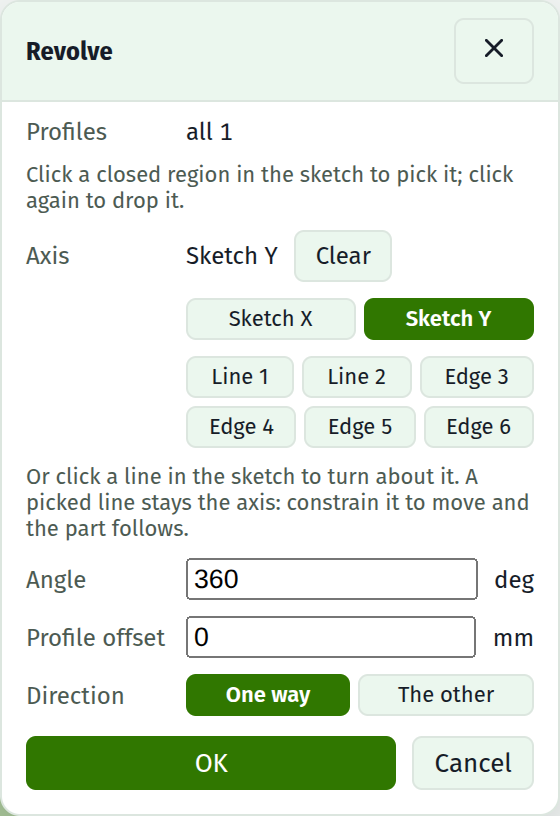
Fields
| Field | Notes |
|---|---|
| Profiles | How many closed regions turn. Click one in the sketch to pick it, click again to drop it, All to go back to every region |
| Axis | Sketch X, Sketch Y, or any line in the sketch, picked by clicking it or off the buttons under the row |
| Angle | Degrees. 360 is a full turn. Expressions and parameters both work |
| Profile offset | Grows the shape being turned this far all round before it sweeps, exactly as it does for an extrude |
| Direction | Base sketches only: which way out of the sketch plane the turn goes |
| Operation | Join, Cut, Intersect, or New body, on a sketch that sits on a face |
The axis is a line, not an arrow
Which end of a line you drew it from does not matter. The direction is worked out against the profile, so picking a line that runs downwards gives exactly the same solid as picking one that runs up.
A profile lying across its axis is refused: turning it would sweep it through itself, and no amount of tolerance makes that a solid.
It follows the line
When the axis is a line in the sketch, what is stored is the line, not where the line was. Constrain that line to move and the turn moves with it: make a plate taller and a turn about its top edge turns about wherever that edge now is.
The two sketch axes are stored as themselves and never move.
Which way a turn goes
On a base sketch the direction is yours: One way or The other, out of the sketch plane either way.
On a sketch that sits on a face, the operation decides, exactly as it does for an extrude. A cut turns into the material behind the face; everything else turns out of it. There is nothing to choose, because there is only one answer that carves anything.
What a turn will not fold into a body
A turn standing on its own does everything: a whole turn, a profile touching its axis, a profile with a hole in it. Those are what a base sketch is for, and they are most of what a revolve is asked to do.
WARNING
Folding a turn into a body that already exists is narrower, and the dialog says so:
- It must stand clear of its axis. A profile touching the axis turns into a surface that closes to a line, which the modelling step cannot take as an operand.
- It must stop short of half a turn. At half a turn the far end lands back in the face it was sketched on, and past that it comes back out of the material and reaches nothing new.
- Its profile must have no holes. The island's wall and the pocket's wall would be the same surface rather than two that meet.
Each of these is a refusal with a sentence, not a wrong solid.
The way round all three is to turn the shape as a New body and then combine it, which has none of the restrictions.
Faces a turn makes have names
Every wall a turn sweeps is named by the sketch curve that swept it, as an extrude's wall is, and a partial turn's two ends are named as its ends. So a revolved face can host a sketch, take a blend, and be traced like any other.
See also
- Extrude, for the other way to make a solid out of the same sketch
- Turn a shaft, for the walkthrough
- Pattern, for repeating a body rather than sweeping a profile
- Timeline, for the row a turn adds and the angle it shows
- Profiles, for what counts as a closed region