
Appearance
The document tree
The panel down the left of the window, under the heading Document: one collapsible group per kind of thing the document holds.
It is one of two panels, and they differ on one thing. This one says what the document has. The one on the right says what you are doing to it: what is picked, what is holding the sketch you are in, and the order it was all built in. Reading the tree and the timeline at the same time is the pairing this is for.
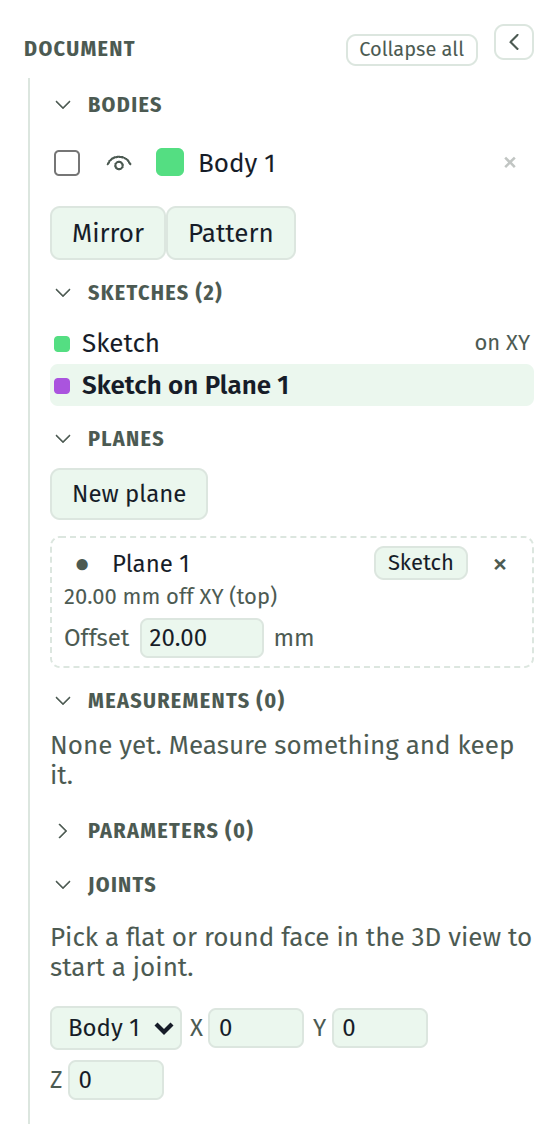
The six groups
| Group | Holds | Detail |
|---|---|---|
| Bodies | Every solid, its colour and its visibility, plus the combines and mirrors between them | Bodies |
| Sketches | Every sketch, and what it stands on | below |
| Planes | The construction planes | Planes |
| Measurements | Measurements kept on the model | Measuring |
| Parameters | The named values every field can be driven by | Parameters |
| Joints | What holds the assembly together | Joints |
Each heading carries a count where a count means something. Click a heading to fold that group; Collapse all folds the whole tree at once, and the button then offers to open it again. What you leave open is remembered between sessions.
The chevron beside it puts the whole panel away, leaving a strip down the edge with the chevron that brings it back. Folding every group and hiding the panel are different: folded, the document still says what kinds of thing it has; hidden, the screen is the model and the tools.
Drag the panel's inner edge to make it wider, up to twice its width. The width it starts at is the narrowest it goes, since that is what its fields were laid out in. The separator takes the keyboard too: ← and → move it, Shift with them moves it faster, and Home puts it back.
Sketches
One row per sketch: a colour chip, its name, and a T where the sketch is text.
A sketch on the world plane is marked on XY. One started on a face or a construction plane already carries that in its name ("Sketch on top face"), so the row does not say it twice.
Click a row to enter that sketch. That is the same thing the pencil on a timeline row does, and this is the shorter way to it when what you want is a sketch rather than a step in the history.
A sketch whose face reference stopped resolving says stale reference and wears a warning triangle. It is still built on its last known plane. The repair is on the timeline row, which is where the whole story of it is.
What is not in the tree
Four things sit outside it on purpose, all of them in the panel on the right.
Selection and the constraint docket are about what is picked and what is holding the sketch you are in, which is context rather than content: change the active sketch and both change with it.
Traced from the model is over there for the same reason. Those references belong to one sketch and are re-read off every new solid.
The timeline is the other reading of the same document. The tree says what the document has; the timeline says the order it was built in, which is a different question and the one you ask when you want to change the past.
No command lives here
The tree holds no field that configures an operation you have not run yet. Every command that takes settings takes them in a floating dialog over the viewport, next to the thing it is about: extrude, blends, offset, mirror, planes and text.
What stays in the tree is the settings of things that already exist: a body's colour, a plane's distance, a joint's angle, a parameter's value.
See also
- The interface tour, for both panels in their places
- The timeline, the other reading of the same document
- The Selection section, at the top of the other panel