
Appearance
The Configure panel
A parameter table drives a model; the Configure panel is the face a creator puts on part of it. Expose a parameter, give it a slider or a set of choices, and someone who did not build the model can turn its knobs without ever seeing an expression.
The panel lives in a drawer of its own on the left, beside the document tree. A collapsed strip labelled Configure brings it out; the chevron in its header puts it away. It starts hidden, and drags wider off the separator on its inner edge like both other panels.
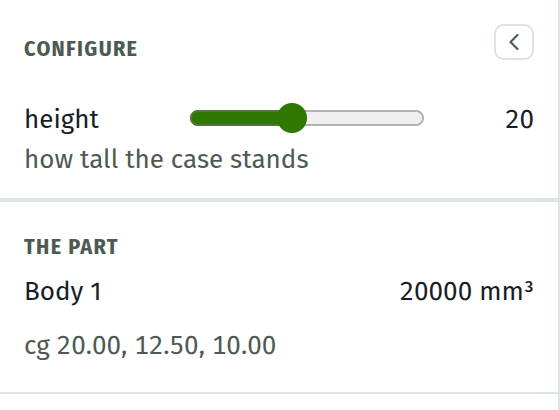
The clip builds a case for a 2.8 inch display board out of a parameter table and gives six of those rows a face here. The last part of it is this panel doing the work: the walls thicken, the window opens up, and a board width taken off the dropdown with a height typed under it re-cuts the case around them. The volume at the bottom of the panel follows every one of those changes.
Exposing a parameter
Every row of the parameters table carries a small gear. It opens the row's Configure face:
| Field | |
|---|---|
| Show in the Configure panel | The switch that puts the row in the panel at all |
| control | field, slider, choices or switch |
| min, max, step | The slider's range. A slider without a range falls back to a field |
| choices | One per line, as label = value. The panel shows the words |
| group | Rows sharing a group stand under one heading |
| hint | One line under the control, saying what turning it does |
The gear lights up while the row is exposed. All of it is stored in the document, so a saved file carries its own form: open someone else's part and their controls are there.
The controls
| Control | Writes |
|---|---|
| field | Any number, committed on Enter or on clicking away |
| slider | The range's steps. The thumb follows the pointer; the model follows a beat behind |
| choices | The value behind the chosen word. A value no choice names shows as custom |
| switch | 1 checked, 0 not, for parameters used as flags |
A control writes a plain number into the parameter, through the same commit the table's own expression field uses. A parameter whose expression still names other parameters is shown read-only instead, with the expression as its tooltip: a knob that silently overwrote width / 2 would break the very model it came with.
The part reads back
Under the controls, the part says what it now is: volume and centre of gravity, for the whole model and per body when there is more than one. The numbers are re-derived from the solid on every rebuild, so they follow every control. An open shell reports its volume as the triangles bound it and owns up to having no dependable centre.
The same numbers are available at a picked face through the measuring tool, which is the place to interrogate one body of an assembly.
What is deliberately not here
The panel shows exposed parameters only. Everything else stays in the table, which is the single place a parameter is created, renamed, or given an expression. There is no second way to define one.