
Appearance
Bodies
The first group of the document tree: one row per solid the document builds, plus the control that booleans two of them together.
A body is a separate solid. It can be hidden on its own, named, painted, deleted, combined with another, and held against another by a joint. See the document model for what makes one.
A row
| Element | What it does |
|---|---|
| Tick box | Picks the body for a move into a group |
| Eye | Hides this body. It leaves the viewport, the volume under the timeline, and the export |
| Swatch | Paints the whole body. Overrides the per-feature colours |
| Name | Click to rename. Empty puts it back on its position |
| × | Deletes the body: every sketch that builds it, and any combine or joint that named it |
The last body cannot be deleted. Use Clear to start the document over.
A body that came out of a file gets a second line saying what the reader made of it: face count, the units it was read in, and whether it came back watertight.
Groups
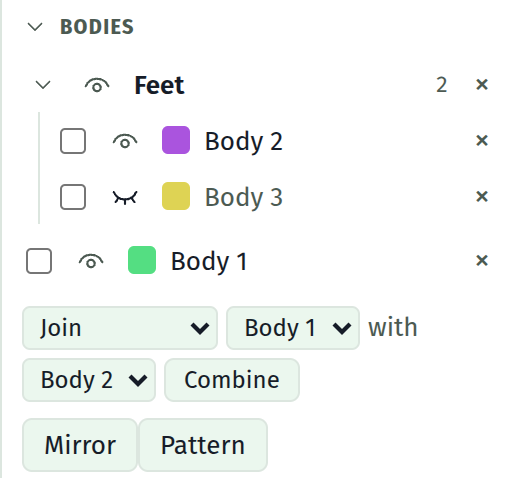
A group folds a run of bodies into one named, collapsible row. It is presentation and nothing else: a body in a group builds exactly as it did loose, and no group enters the model.
Making one
Tick the bodies you want, then use the strip that appears below the list:
| Choose | Result |
|---|---|
| New group | A fresh group holding them, named Group 1, Group 2 |
| An existing group | They move into it |
| No group | They go back out into the loose part of the list |
Press Move N. A body is in at most one group, so a move is a move rather than a second claim on the same body.
The header
| Element | What it does |
|---|---|
| Caret | Folds the group shut. The bodies are still there; the rows are not shown |
| Eye | Hides every body in the group at once, and shows them all again when none is showing |
| Name | Click to rename |
| Count | How many bodies are in it |
| × | Breaks the group up. Every body in it stays, loose |
Nothing on a group deletes a body. The × on a body row does that; the × on a group row only undoes the folding.
Imported assemblies
A file holding more than one part arrives already folded, as a group named after the file. Forty-five loose rows is the state that is for. Break it up with the × if you would rather have them loose.
What is not kept
Whether a group is folded shut is not saved. Which bodies are in which group, and what each group is called, both are.
Hidden bodies are not saved either. Every body comes back showing.
The boolean picker
Shown once there are two or more bodies. Grouping does not affect it: every body is offered whether it is in a group or not.
| Operation | What it means |
|---|---|
| Join | The tool is added into the target |
| Cut with | The tool is subtracted from the target |
| Keep shared | Only what both occupy survives |
The tool body is consumed. Each combine is listed under the picker in the order it is applied, and the × on one puts the consumed body back.
WARNING
Two solids that touch on a face have that face parted by a few microns before the boolean runs, since faces that lie exactly on each other are what the modelling step cannot resolve. Expect a millimetre or so of volume either way.
Mirror
Below the picker, and shown as soon as there is a body. It reflects one in a plane, either as a body of its own or fused straight back into the source. Each mirror is listed under the button the way a combine is, and the × on one undoes it.
See Mirror for the dialog and what the seam costs.
Pattern
Beside Mirror, and shown on the same terms. It copies a body along a line or round an axis, either as bodies of their own or folded straight back into the source. Each pattern is listed under the button and the × on one undoes it.
See Pattern for the dialog and the two kinds.
See also
- Mirror, for reflecting a body in a plane
- Pattern, for repeating one along a line or round an axis
- Joints, for holding two bodies to each other rather than fusing them
- A second body, for the walkthrough
- The document model, for what a body is
- Import a solid, for where assemblies come from