
Appearance
Text
A text feature is a sketch whose geometry is letter outlines rather than anything drawn. It behaves as a sketch in every other respect: it sits on the world plane or on a face, it extrudes, and its extrude adds or cuts.
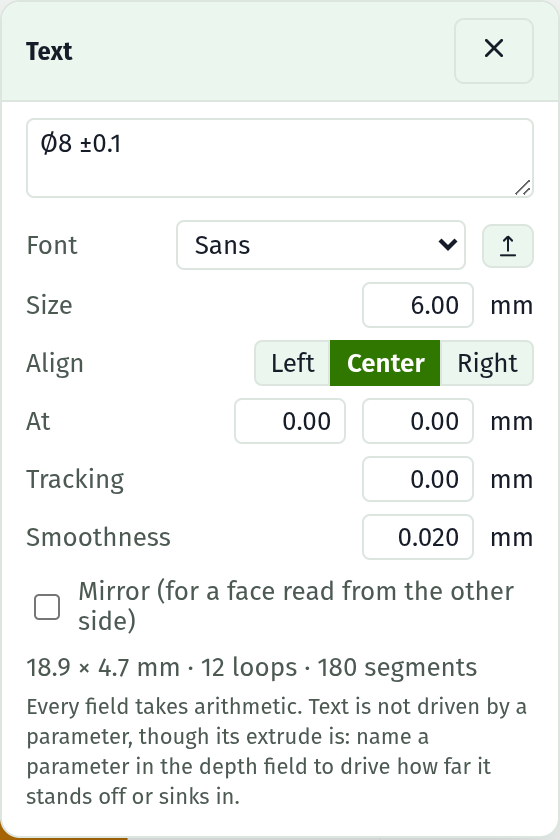
The Text dialog floats over the sketch while a text feature is the active one. Closing it leaves the feature alone: the document holds the spec, and entering the sketch again from the document tree or the timeline brings the dialog back.
Making one
| Where | What you get |
|---|---|
| Text on face, in the Selection section with a face picked | A text sketch on that face, centred on it |
| Text, at the bottom of the Timeline | A text sketch on the world plane, as a body of its own |
Fields
| Field | Notes |
|---|---|
| Text | The string. Enter is a newline, not a commit; the field commits when you click away |
| Font | Three bundled faces (Sans, Sans bold, Sans condensed) plus anything loaded this session |
| Size | Em size in mm. A capital comes out about 0.7 of it, following the font's own metrics |
| Align | Left, Center or Right: which end of each line the At position fixes |
| At | Where the first baseline starts, in the sketch's own millimetres |
| Tracking | Extra millimetres between glyphs. Negative tightens |
| Line pitch | Baseline to baseline as a multiple of the size. Shown once the string has a newline in it |
| Smoothness | Millimetres of allowed error when a curve is broken into straight segments |
| Mirror | Flip across the vertical through At |
Every numeric field accepts arithmetic. Every field re-cuts the outlines as it commits, so the canvas always shows the geometry the solid will be built from.
Below the fields, the section reports the size of the ink, the number of closed loops and the number of segments. The segment count is worth watching: each one becomes a wall of the solid.
Depth is not here
A text feature has no depth field of its own. Its extrude is the depth, so the Timeline row is where it lives, labelled Emboss for an add and Engrave for a cut. That field takes a parameter; the text fields do not.
Fonts
The bundled faces carry printable ASCII plus degree, diameter, plus-minus, micro, ohm, prime, double prime, and the halves and quarters. A character no face carries is reported by name and left out.
The upload button beside the picker takes a .ttf file. TrueType outlines only: an OpenType file with PostScript outlines (an OTTO file) is refused with that reason rather than drawn wrongly. A loaded face lasts the session and is offered to every text feature.
What is saved
Both halves, and they are different things:
- The outlines, as sketch geometry. Storing those leaves the part self-contained: it opens, rebuilds, measures and exports with no font present.
- The string and its settings. This is what keeps it editable.
A document whose font is not loaded is therefore fully functional and not fully editable. The picker shows the face it was set in, marked not loaded; load that file and the string is editable again.
Locked geometry
Every vertex of a text feature is locked. What follows from that:
- The sketch reads fully constrained with an empty constraint docket, which is correct: nothing in it is free.
- Nothing can be dragged, in either view. Position comes from the At fields.
- No handles are drawn, so a hundred glyph vertices do not clutter the canvas. The outlines themselves draw as ordinary lines.
Limits
- Editing the string re-cuts the whole sketch, so anything drawn into a text sketch by hand is lost. Draw that in its own sketch on the same face.
- A text edit is not undoable.
- A blend on a letter's own face goes stale when the string changes. The Timeline reports it rather than re-aiming it.
- Text sits on a flat face. A curved face cannot host a sketch of any kind.